An automated marketing workflow is a system of triggers, conditions, and actions that executes marketing tasks based on customer behavior or predefined rules, saving time and increasing personalization at scale.
Key Takeaways
- marketing workflows combine triggers, conditions, and actions to deliver personalized messages at scale.
- According to Oracle, businesses using marketing automation see a 451% increase in qualified leads.
- Industry data shows 76% of marketers who implement automation report positive ROI within a year.
- AI-powered workflows can improve conversion rates while dramatically reducing send volume, as demonstrated at Bloomreach Innovation Fest 2026.
- Essential workflows include welcome series, abandoned cart recovery, and post-purchase nurture.
- Tracking the right KPIs prevents workflow fatigue and protects long-term ROI.
What Is an Automated Marketing Workflow?

Definition and Core Principles
A marketing automation workflow is a series of automated actions triggered by specific customer behaviors or predefined conditions. Instead of manually sending emails, updating contact records, or routing leads, marketers set up rules that handle these tasks instantly and consistently. The workflow runs in the background, responding to each customer’s actions exactly as designed, every time.
At its simplest, an this type of workflow is built on three core components: triggers (the customer action that starts the workflow), conditions (rules that determine which path a customer follows), and actions (the response, such as sending an email or updating a CRM field). Together, these elements create a self-operating marketing engine that learns and adapts, especially when enhanced with AI.
Why Automated Marketing Workflows Matter
Without automation, personalization has a ceiling. A team of five marketers can’t manually customize campaigns for 500,000 customers across email, SMS, push notifications, and web. this kind of workflows remove this constraint by making every customer interaction data-driven and consistent. According to a HubSpot report citing Oracle research, businesses using marketing automation see a 451% increase in qualified leads. A separate study referenced by Bloomreach reveals that 76% of marketers who implement marketing automation see a positive ROI within a year. These efficiency gains explain why workflow automation is now a standard part of modern marketing stacks.
Core Components of an Automated Marketing Workflow
Triggers, Conditions, Actions, and Timing
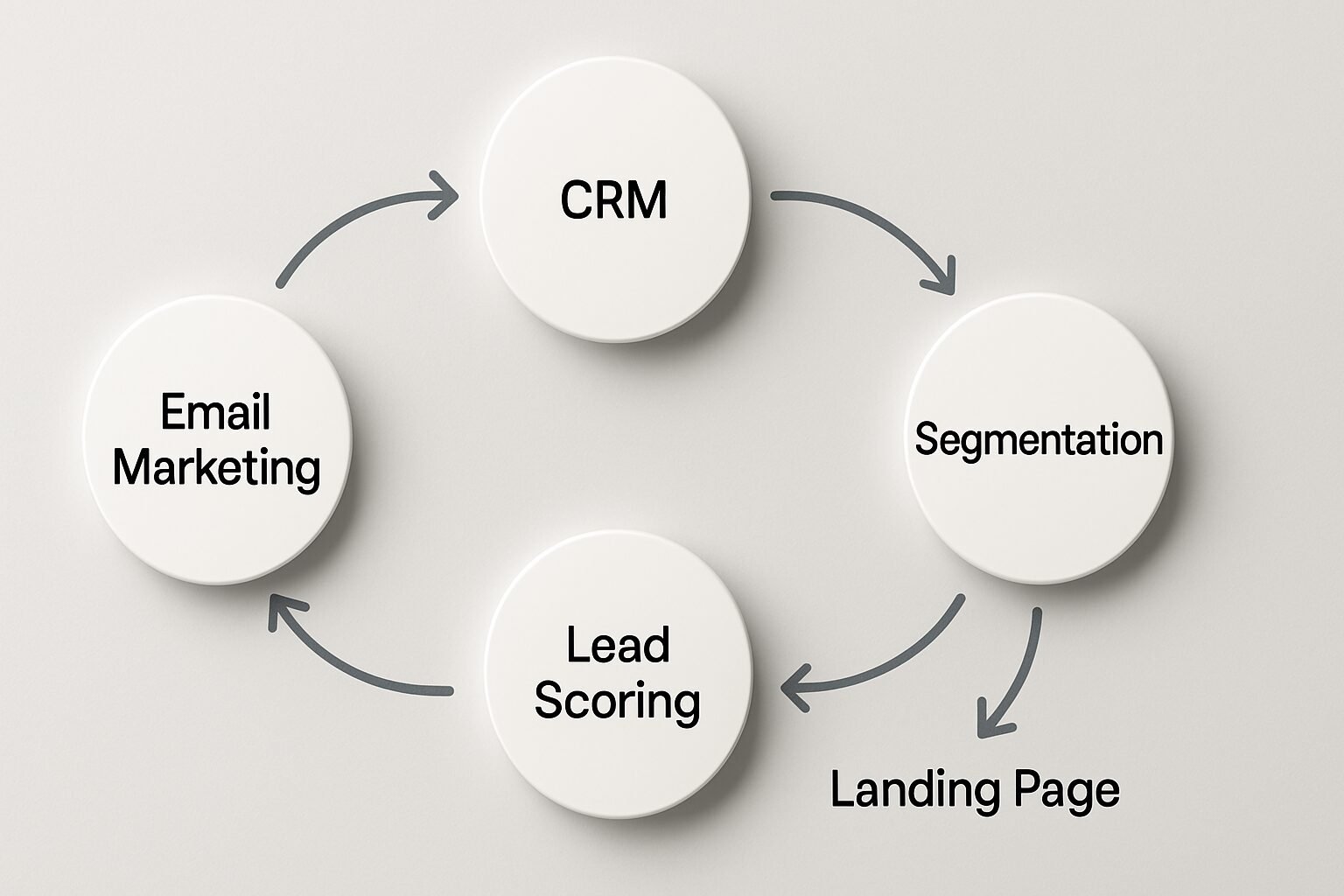
Every automated marketing rests on four pillars:
- Trigger – The customer action that kicks off the workflow. Common triggers include form submissions, email clicks, page visits, abandoned carts, or a contact’s lifecycle stage change. Without a trigger, the workflow never activates.
- Condition – A rule that checks whether a contact meets specific criteria before the workflow proceeds. Conditions let you branch logic, for example, “if the contact is a first-time buyer” or “if cart value exceeds $100,” ensuring the right message goes to the right person.
- Action – What the system does when the trigger fires and conditions are met. Actions can include sending an email, adding a tag, updating a CRM property, routing a lead to sales, or triggering another workflow.
- Timing – When the action executes. It could be immediate, after a fixed delay, or at an AI-optimized send time for each recipient. Timing ensures messages arrive when the customer is most likely to engage.
Chaining these components together creates a continuous, adaptive customer journey. One action can set off the next workflow, building a connected cross-channel experience.
The Role of Data and Segmentation
High-quality customer data fuels effective workflows. Clean, unified profiles enable granular conditions and truly personalized actions. Leading platforms such as Insider One and HubSpot offer progressive profiling and behavioral tracking, enriching data with every interaction. Progressive profiling is especially valuable in B2B lead nurturing: rather than asking for 10 fields upfront, you collect one or two new data points per form visit, building a complete picture over time without friction. Segmentation, which groups contacts by behavior, demographics, or purchase history, allows a single marketing workflow to handle dozens of customer variations without manual list building.
Step-by-Step Guide to Build Your First Automated Marketing Workflow
Step 1: Define Goals and Map the Customer Journey
Start with a clear business objective: recover abandoned carts, welcome new subscribers, or nurture leads. Then sketch the customer journey, mapping what actions should happen from trigger to conversion. This blueprint becomes the backbone of your this type of workflow.
Step 2: Choose Your Trigger Events
Select the precise customer action that will activate the workflow. Common examples:
- A user submits a sign-up form
- A customer abandons their cart without purchasing
- A lead reaches a certain lead score threshold
- A contact clicks a specific link in an email
Many platforms, including ActiveCampaign and Bloomreach, allow triggers from web tracking, API events, and CRM updates, giving you a wide range of starting points.
Step 3: Design the Workflow Sequence
- Determine conditions – What must be true for the contact to move forward? For example, “has not purchased in 30 days” or “is a current customer.”
- Add actions – For each branch, define the marketing action. A common sequence for a welcome series might be: send a thank-you email with a discount code, wait two days, send a brand story email, wait three days, send a best-seller showcase.
- Set timing and delays – Space out actions to avoid overwhelming the customer. AI tools can now automatically optimize the delay between messages for each individual.
- Test the workflow – Use a test contact to run through the entire sequence. Check that all conditions branch correctly and that emails render properly.
- Activate and monitor – Turn the workflow live, then track performance metrics like open rate, click rate, and conversion rate. Make adjustments based on results.
With a drag-and-drop builder, this whole process can take less than an hour. Once live, the workflow runs 24/7, engaging customers while your team focuses on strategy.
10 Proven Automated Marketing Workflow Examples for 2026
Here are ten workflows every marketing team should consider implementing, drawn from top-performing brands and platform case studies.
1. Welcome Series
Introduces new subscribers to your brand, delivers the promised incentive, and guides them toward a first purchase. Triggered by a sign-up, the workflow sends a sequence of educational and promotional emails over 5 to 8 days. Best channels: email and SMS.
2. Abandoned Cart Recovery
Recovers revenue by reminding shoppers of items left behind. With an average cart abandonment rate of around 70%, and mobile rates exceeding 80% according to Bloomreach, even a modest recovery rate can lift total sales significantly. The workflow typically sends a reminder within an hour, followed by a reassurance email at 24 hours, and a final incentive at 48 hours.
3. Post-Purchase Nurture
Builds loyalty after a first order. Immediately after purchase, it sends a thank-you message, then product tips after 7 to 10 days, and a cross-sell recommendation after 21 days. This workflow helps turn one-time buyers into repeat customers.
4. Lead Nurturing
Moves leads through the funnel by sending educational content tailored to their interests. When a lead downloads an eBook, for example, the system scores their engagement and delivers more in-depth resources until they become sales-ready. Most B2B teams find that a 5 to 7 email nurture sequence is the sweet spot before a sales handoff.
5. Re-engagement Campaigns
Targets inactive contacts. If a subscriber hasn’t opened an email in 90 days, the workflow sends a “we miss you” message with a special offer, then suppresses further sends if there’s no response, keeping lists clean and deliverability healthy.
6. Birthday or Anniversary Offers
Uses date fields in your CRM to send a personalized discount or greeting on a customer’s birthday or sign-up anniversary. Simple to build but highly effective for building emotional loyalty, and it costs almost nothing to run once it’s live.
7. Cross-Sell and Upsell
After a purchase, the workflow recommends complementary products based on order history. A customer who bought a camera might receive emails about lenses or cases. This approach increases average order value with zero manual effort per transaction.
8. Abandoned Browse (Not Cart)
Triggers when a known user views a product page multiple times without adding to cart. The workflow sends a gentle “still interested?” email with similar items or customer reviews, nudging them back to the site before the intent fades.
9. Event Follow-Up
After a webinar or live event, the system automatically sends a thank-you email with the recording, a survey, and a call to book a demo. Leads from events stay warm without sales having to chase every attendee individually.
10. Feedback and Survey Requests
After a support ticket is closed or a purchase is delivered, an automated sequence sends a Net Promoter Score (NPS) survey or a review request. Timing is critical here. Sending too early or too late hurts response rates, so let the workflow handle the scheduling automatically.
AI-Powered Automation: The Next Generation of Workflows
How AI Transforms Triggers and Personalization
Traditional workflows follow static rules. AI-powered automation adds a layer of machine learning that continuously optimizes performance. Instead of setting fixed delays, AI determines the best send time for each contact. Instead of one generic message, AI dynamically assembles content, including subject lines, product images, and offers, based on real-time behavior.
Bloomreach’s Marketing Agent, launched in 2026, converts a single prompt into a fully built, multi-step workflow, reducing setup time from hours to minutes. AI capabilities like send-time optimization, next-best-channel selection, and automatic A/B test winner selection are now standard features in platforms like Insider One and ActiveCampaign. These features not only save time but also drive measurable results: during Bloomreach’s Innovation Fest 2026, AI-driven workflows achieved a 35% conversion rate increase, $10K more revenue per campaign, and an 82% reduction in sends, proving that smarter automation produces more with less.
“The best marketing automation isn’t about sending more messages. It’s about sending the right message to the right person at the right time, and AI is finally making that possible at scale.” – Bloomreach Innovation Fest 2026 findings
Real-World AI Workflow Results
The impact of AI on automated marketing workflows is measurable. In a Total Economic Impact study commissioned by Insider One, customers realized a 449% ROI and $10.2M in incremental revenue by using AI-native cross-channel automation. These results reflect the compounding advantage of workflows that learn and improve over time, not a one-time lift.
“According to Insider One’s Total Economic Impact study, organizations using AI-native cross-channel automation realized a 449% ROI, with payback periods measured in months rather than years.”
Cross-Channel Orchestration and Advanced Branching Logic
Going Beyond Email
Cross-channel orchestration is where modern automated marketing workflows separate from basic email sequences. Insider One supports automation across 12+ channels, including email, SMS, push notifications, in-app messages, web personalization, and paid ad audiences. The real power comes from branching logic: if a contact opens an email, send a follow-up SMS; if they don’t open within 24 hours, serve a retargeting ad instead.
Custom API triggers extend this further. Your CRM, point-of-sale system, or mobile app can fire a workflow event the moment a meaningful action occurs, whether that’s a patient booking an appointment, a customer completing a service call, or a lead requesting a quote. For local service businesses like dental practices, MedSpas, and HVAC companies, this kind of real-time trigger can mean the difference between a booked appointment and a lost lead.
As of 2026, platforms like HubSpot also support what they call a Loop marketing playbook approach: rather than treating the customer journey as a linear funnel, workflows loop back based on post-purchase behavior, creating a continuous cycle of engagement, feedback, and re-activation. This model is particularly effective for subscription businesses and service providers with recurring revenue.
Choosing the Right Automated Marketing Workflow Software
Key Features to Look For
Not all platforms are created equal. When evaluating software, prioritize:
- Visual drag-and-drop builder: a no-code interface for fast workflow creation.
- Multi-channel support: email, SMS, push notifications, social media, and ads.
- CRM integration: reliable data sync between marketing and sales.
- AI capabilities: send-time optimization, predictive content, and automatic branching.
- Robust reporting: attribution, engagement scoring, and A/B testing.
- Scalability: the ability to handle thousands of contacts without performance drops.
Tools Comparison Table
| Tool | Key Strengths | AI Capabilities | Best For | Starting Price |
|---|---|---|---|---|
| HubSpot | All-in-one CRM, sales alignment, Gartner leader 4 years running | AI content assistant, predictive lead scoring | Mid-market to enterprise | From $45/mo |
| Bloomreach | AI-native personalization, ecommerce focus | Marketing Agent, 35 percent CVR lift, 82 percent fewer sends | Ecommerce, retail | Custom pricing |
| ActiveCampaign | Intuitive builder, 900+ integrations | Predictive sending, win probability scoring | SMBs, startups | From $15/mo |
| Insider One | 12+ channels, drag-and-drop, zero-copy migration | Send-time optimization, next-best channel | Enterprise cross-channel | Custom pricing |
Pros and Cons of Automated Marketing Workflows
Pros
- Saves significant time: Once built, workflows run 24/7 without manual intervention, freeing your team for strategy and creative work.
- Scales personalization: You can deliver tailored messages to thousands of contacts simultaneously, something no manual process can match.
- Improves lead quality: Automated lead scoring and nurturing sequences deliver warmer, better-qualified prospects to your sales team.
- Measurable ROI: Every workflow action is trackable, making it straightforward to attribute revenue and calculate return on investment.
- Reduces human error: Consistent, rule-based execution means the right message goes out at the right time, every time.
Cons
- Setup requires upfront investment: Building effective workflows takes time, strategic thinking, and sometimes technical resources, especially for complex branching logic.
- Risk of workflow fatigue: Without frequency caps and suppression logic, contacts can receive too many messages and disengage or unsubscribe.
- Data dependency: Workflows are only as good as the data feeding them. Poor data quality leads to misdirected messages and wasted spend.
- Ongoing maintenance needed: Workflows are not truly “set and forget.” They require regular audits, A/B testing, and updates as your audience and offers evolve.
Measuring Success: KPIs and ROI of Automated Workflows
Essential Metrics to Track
To prove the value of any automated marketing workflow, you must track more than open rates. Key performance indicators include:
- Engagement rate: Opens and clicks relative to deliveries.
- Conversion rate: The share of workflow recipients who complete the desired action, whether that’s a purchase, form fill, or booked appointment.
- Time to conversion: How quickly workflow-enrolled contacts convert compared to non-automated groups.
- Unsubscribe and complaint rates: Early warning signals of over-automation or irrelevant messaging.
- Workflow-attributed revenue: Trackable via UTMs or CRM attribution models.
Platforms like HubSpot and Bloomreach bake these metrics into workflow dashboards, making it straightforward to spot drop-offs and test variations.
Calculating the Return on Workflow Automation
The basic ROI formula is: (Revenue attributed to workflow minus cost of automation tool and time spent) divided by total cost. With industry data showing 76 percent of marketers achieve positive ROI within a year, and Insider One customers reporting 449 percent ROI in their Total Economic Impact study, the financial case for investing in an automated marketing workflow is strong. Start with one high-impact flow, measure its return, then scale to additional tiers.
Common Pitfalls and How to Avoid Workflow Fatigue
Over-Automation and Spam Risks
Workflow fatigue occurs when customers receive too many automated messages and disengage. A single contact might be simultaneously enrolled in a welcome series, an abandoned cart flow, and a re-engagement campaign, resulting in a flood of emails. To prevent this:
- Set frequency caps: limit how many messages a contact can receive per week across all active workflows.
- Implement suppression windows: pause all promotional automations for 24 hours after a purchase.
- Build conditional logic: if a contact has already converted, remove them from related nurturing flows immediately.
The goal is relevance, not volume. AI-powered send controls in modern tools can automate these caps, ensuring your automated marketing workflow stays welcome in the inbox.
Failing to Test and Optimize
An automated marketing workflow is not a “set and forget” asset. Without regular testing, performance plateaus or declines. A/B test subject lines, email copy, calls to action, and send times. Use holdout groups to measure true lift. Platforms like HubSpot offer built-in testing suites, while Bloomreach’s AI agent can auto-select the winning variant. Continuous improvement transforms a good workflow into a consistent revenue driver.
Frequently Asked Questions
What is an example of a marketing automation workflow?
A classic example is the abandoned cart recovery workflow: a shopper adds items to their cart but leaves without buying, triggering an automated reminder email within one hour, a follow-up with social proof at 24 hours, and a discount offer at 48 hours. This three-step sequence runs automatically and can recover a meaningful share of otherwise lost revenue.
Which marketing automation workflow is most common?
The welcome series is the most widely used automated marketing workflow across industries. It activates the moment someone subscribes or signs up, delivering a brand introduction, a promised incentive, and a path to first purchase over 5 to 8 days. Most email platforms include a welcome series template out of the box.
What is an automated marketing workflow?
An automated marketing workflow is a predefined sequence of marketing actions, such as sending emails, updating CRM records, or routing leads, that executes automatically based on customer behavior or set conditions. It removes manual work from repetitive tasks and ensures consistent, timely communication at scale.
How do I create an automated marketing workflow?
Define your goal, select a trigger event, map the sequence of conditions and actions, set timing and delays, then activate using a platform like HubSpot, Bloomreach, or ActiveCampaign. Test thoroughly with a sample contact before going live, and monitor performance metrics closely in the first two weeks.
What is workflow fatigue and how do you prevent it?
Workflow fatigue occurs when contacts receive too many automated messages across overlapping sequences and start ignoring or unsubscribing from them. Prevent it by setting weekly frequency caps, using post-purchase suppression windows, and adding conditional exit logic that removes converted contacts from active nurture flows.
Can small businesses benefit from automated marketing workflows?
Absolutely. Even a team managing a few hundred contacts can use basic workflows to save hours each week on repetitive tasks and deliver a more professional customer experience. Start with a welcome series or abandoned cart reminder, both available on plans starting at $15 per month with tools like ActiveCampaign, and scale from there.
Ready to put this into practice for your own business? Book a free demo at digimeapp.com to see how AI-powered automated marketing workflows can save your team hours each week and drive more revenue from the contacts you already have.