A marketing automation workflow is a series of automated actions triggered by customer behaviors, delivering personalized messages across channels to nurture leads and drive revenue without manual effort.
Key Takeaways
- A automation workflow replaces manual, repetitive tasks with rule-based sequences that respond to real-time customer signals.
- Every workflow has four core components: triggers, conditions, actions, and timing.
- According to industry data, automated emails generate 320% more revenue than standard promotional campaigns.
- Modern tools like Insider One, Bloomreach, and HubSpot offer AI-enhanced, cross-channel capabilities for building smarter workflows.
- Abandoned cart recovery, lead nurturing, and welcome sequences are among the highest-impact workflows you can implement today.
- Privacy compliance (GDPR, CAN-SPAM) is a non-negotiable part of any responsible automation strategy.
What Is a Marketing Automation Workflow?
Definition and Core Concept
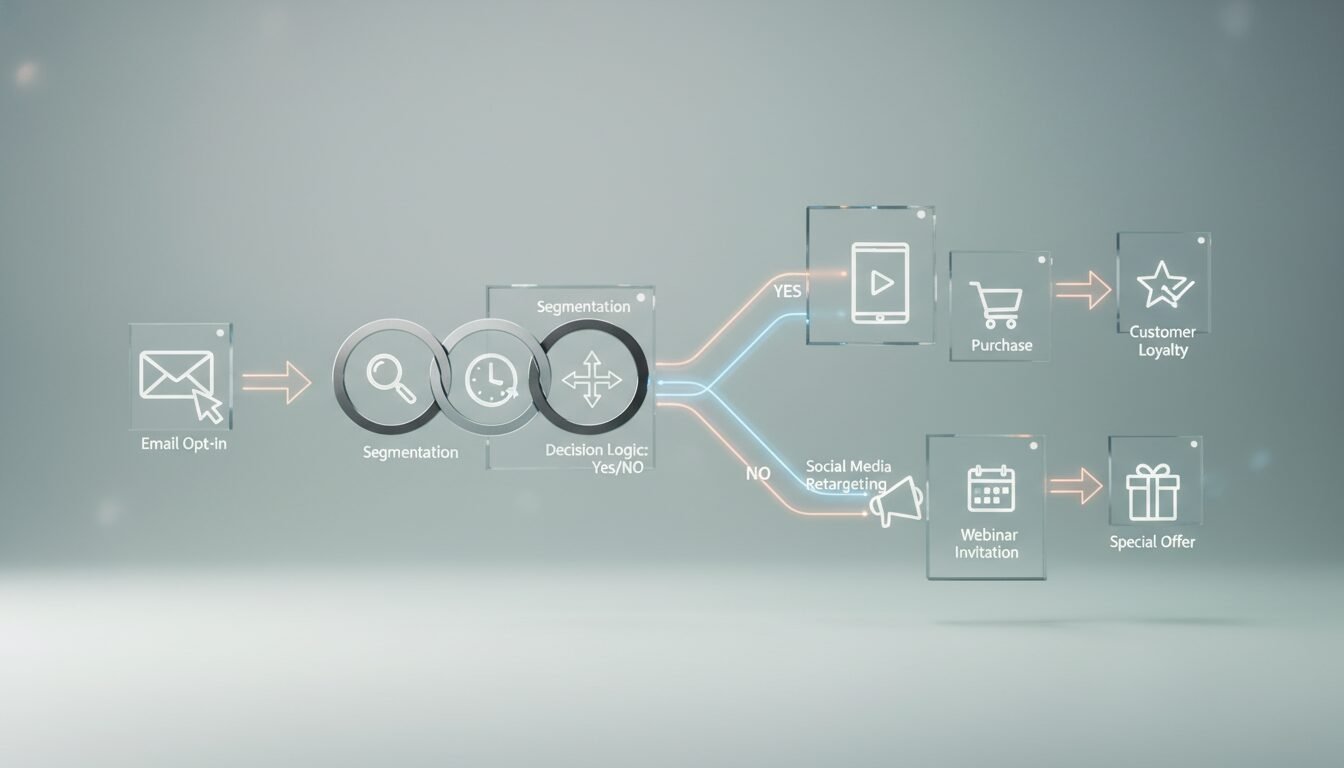
A this type of workflow is a pre-defined set of rules that automatically execute marketing actions when specific triggers fire and conditions are met. According to the Bloomreach 2026 guide, every workflow has four essential components: triggers (customer actions like form submissions or page visits), conditions (rules that branch the path), actions (the response, such as sending an email or updating a CRM), and timing (delays or send-time optimization). Unlike one-off campaigns, a workflow chains these steps to create a continuous, adaptive customer journey across email, SMS, WhatsApp, web, and more.
How It Differs from Simple Email Automation
Simple email automation might send a single welcome message to a new subscriber. A true this kind of workflow goes further. It can score that lead based on engagement, trigger a series of personalized emails over days or weeks, and branch to different paths depending on opens, clicks, or purchases. Insider One’s platform, for example, enables cross-channel workflows spanning 12+ channels, using AI to decide not only when to send, but which channel each recipient is most likely to engage with next.
Why Marketers Are Adopting Workflows Rapidly
The shift toward automation isn’t optional anymore. According to Bloomreach, 76% of marketers who implement marketing automation systems see a positive ROI, often within the first year. As manual campaign management becomes unsustainable at scale, businesses are turning to automated sequences to deliver consistent, relevant messaging while freeing teams to focus on strategy and creative work.
Why Marketing Automation Workflows Matter
Time and Resource Savings
The most immediate benefit of a marketing automation is reclaiming hours lost to manual busywork. Instead of uploading lists, sending one-off emails, or updating lead statuses by hand, teams use automation to handle the repetitive parts of marketing, sales, and service. HubSpot’s workflow automation engine, for example, lets users automate everything from deal rotation to follow-up task creation, reducing administrative overhead significantly. Most teams report saving 10-15 hours per week once core workflows are running.
Personalization at Scale
Personalization has a ceiling without automation. A team of five marketers can’t manually tailor campaigns for half a million contacts across five channels. A well-built workflow removes that constraint by making every interaction data-driven. It pulls from behavioral analytics, CRM attributes, and real-time browsing to deliver individualized product recommendations, dynamic content, and channel-optimized messages – all without manual effort.
Revenue and ROI Impact
The financial upside is backed by real numbers. SALESmanago reports that automated emails generate 320% more revenue than standard promotional mailings. Abandoned cart workflows alone can recover a meaningful share of the estimated $18 billion in lost ecommerce revenue each year. When integrated into a cohesive automation strategy, these tactical wins compound into measurable lifts in conversion rates, average order value, and customer lifetime value.
“Automation isn’t about replacing the human touch in marketing. It’s about making sure the human touch shows up at exactly the right moment, for exactly the right person.” – HubSpot State of Marketing Report
Core Components of an Automation Workflow
Triggers: The Starting Point
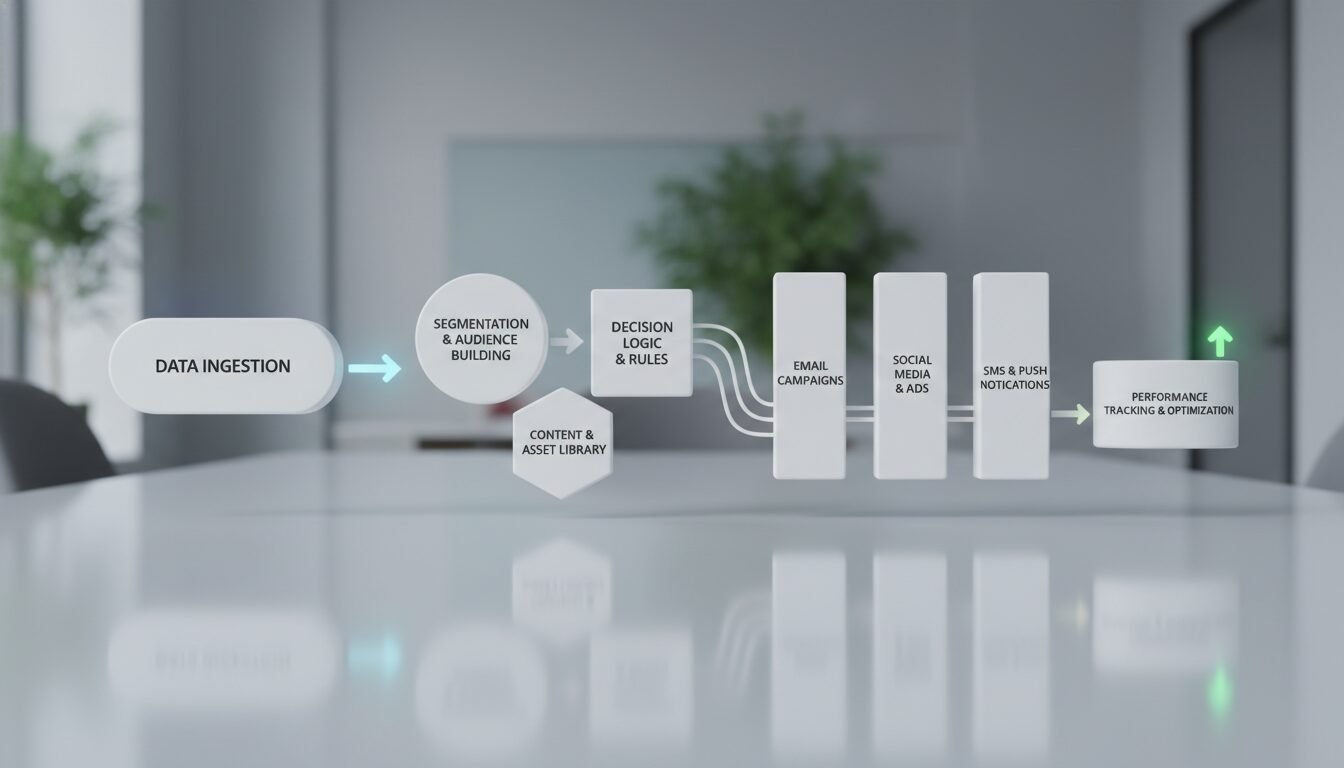
A trigger is what kicks off the entire sequence. It can be a form submission, a purchase, a browse event, a period of inactivity, or even a change in CRM data. For example, when a visitor signs up for a newsletter, that action triggers the workflow. Advanced platforms like Insider One support dozens of native and custom triggers across web, email, SMS, app, and more – giving you precise control over when automation fires.
Conditions and Branching Logic
Conditions are rules that evaluate the contact against specific criteria before deciding the next step. They bring real intelligence to a automation workflow. After a trigger fires, a condition might ask: “Is this a first-time buyer?” or “Has the contact opened the last email?” Depending on the answer, the workflow branches to different action sequences. Bloomreach emphasizes that well-designed conditions prevent irrelevant messaging and meaningfully boost engagement rates.
Actions and Integrations
Actions are what the workflow actually does once the trigger fires and conditions are met. Typical actions include sending an email, adding a CRM tag, assigning a lead to a sales rep, firing a webhook to an external tool, or updating a segment. The best platforms – like Activepieces and HubSpot – offer deep integration libraries. Activepieces alone connects to 731+ apps, so your actions can span your entire martech stack without custom code.
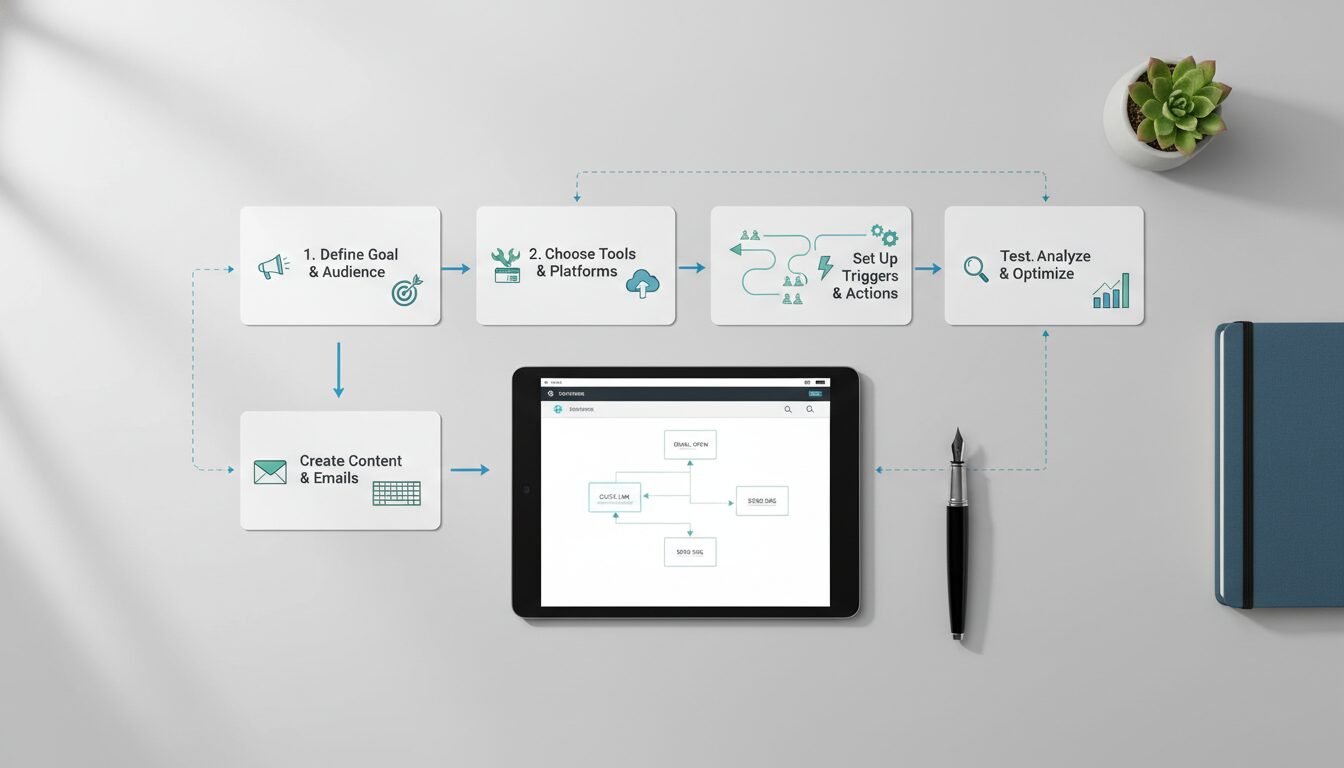
Step-by-Step: How to Build a Marketing Automation Workflow
Step 1: Define Clear Goals
Begin by articulating exactly what you want the workflow to achieve. Is the goal to convert abandoned carts, nurture new leads, reactivate dormant subscribers, or cross-sell existing customers? A focused goal determines everything else: triggers, content, timing, and success metrics. Without a clear objective, workflows tend to become overly complex and fail to deliver measurable ROI.
Step 2: Map the Customer Journey
Sketch the path your customers actually take, not what you assume they take. Look at real behavioral data to identify key touchpoints where automation could add value. For an abandoned cart recovery workflow, the journey typically includes: product page view, add to cart, cart view, then session exit. The this type of workflow inserts a sequence of reminders and incentives after that exit point.
Step 3: Choose Triggers and Conditions
Select the specific event that will start the workflow and the conditions that guide personalization. For a welcome sequence, the trigger might be “form submission on newsletter signup.” Conditions could segment audiences by source (organic, paid ad, referral) or by expressed interests. Tools like Insider One provide a drag-and-drop editor to visually connect these steps, with AI suggesting conditions to maximize engagement.
Step 4: Design the Action Sequence
Build out the series of actions – emails, SMS, push notifications, web experiences – that will unfold over time. Many this kind of workflow templates mix immediate and delayed actions. For instance: an immediate “Thank you” email, educational content 2 days later, then a product recommendation at day 7. Timing is critical. Insider One’s AI send-time optimization automatically adjusts delivery to each recipient’s most active window.
Step 5: Test and Optimize
Launch the workflow in test mode, then monitor key metrics: open rates, click-throughs, conversion rates, unsubscribes. Use A/B testing to refine subject lines, content, and timing. A marketing automation is never “set and forget.” Regular optimization ensures it keeps performing as audience behavior evolves. Insider One can auto-select the winning variant based on statistical significance, saving hours of monitoring.
9 Proven Marketing Automation Workflow Examples
Welcome Email Sequence
A welcome automation workflow does more than say “hello.” It introduces the brand, sets expectations, and begins relationship-building. Insider One recommends tailoring welcome sequences based on how leads were acquired – different messages for organic sign-ups versus paid campaign leads. A multi-step series can share educational content, product highlights, and a first-purchase incentive over two to three weeks.
Abandoned Cart Recovery
According to SALESmanago, abandoned carts cost ecommerce brands $18 billion annually. A well-crafted recovery workflow sends a series of reminders via email, SMS, or WhatsApp within hours of abandonment, often including a discount or free shipping offer. Automated sequences in this context generate 320% more revenue than standard promotional campaigns – making this one of the highest-ROI workflows available.
Post-Purchase Follow-Up
After a customer buys, a this type of workflow can trigger a thank-you note, a product usage guide, a review request, or a cross-sell recommendation. SALESmanago notes that post-purchase automation deepens loyalty and increases repeat purchase rates. Timing the cross-sell offer 7 to 14 days post-delivery typically yields the highest engagement.
Lead Nurturing and Scoring
Activepieces’ lead nurturing template demonstrates a workflow that assigns lead scores based on page visits, email opens, and link clicks. Once a contact crosses a threshold (for example, a score above 50), the workflow auto-tags it as a marketing-qualified lead and notifies the sales team. The sequence continues sending content that fits the lead’s expressed interests and lifecycle stage.
Win-Back and Re-engagement
Inactive subscribers and past customers represent untapped potential. A win-back workflow identifies contacts who haven’t engaged in 90+ days and sends a reactivation email series, perhaps ending with a “We miss you” discount. If no action is taken, the workflow can automatically archive the contact to keep your database clean and your deliverability scores healthy.
Browse Abandonment
Not all visitors add to cart. Many browse products and leave. Browse abandonment workflows fire when a user views a product multiple times or spends significant time on a page but doesn’t proceed. The triggered this kind of workflow can display a web personalization overlay or send a follow-up email with similar items, capturing demand that would otherwise be lost.
VIP Customer Segmentation
High-value customers deserve special treatment. A workflow can identify customers who exceed a lifetime value threshold or make frequent purchases, then move them into a VIP segment automatically. From there, it automates perks: exclusive product previews, early access to sales, or personalized offers. These touches consistently boost retention and word-of-mouth referrals.
Cross-Sell and Upsell
Using purchase history, a marketing automation workflow can recommend complementary products at strategic intervals. A customer who buys a camera might receive an automated email sequence promoting lenses, tripods, and carry cases over the following weeks. Insider One’s AI personalization engine automatically surfaces the most relevant products based on individual behavior and similar customer patterns.
Event-Triggered Campaigns
Birthdays, anniversaries, or loyalty milestones can trigger a workflow that delivers celebratory messages with a time-limited offer. These personal, context-aware touches consistently outperform generic batch campaigns, often doubling open rates and click-throughs compared to standard sends.
AI’s Role in Modern Workflow Automation
AI-Powered Send-Time Optimization
Instead of guessing when a contact is most likely to engage, AI analyzes historical behavior for each individual and schedules messages accordingly. Insider One’s send-time optimization feature automatically adjusts delivery windows within a marketing automation workflow, lifting open rates without any manual tuning. This alone can meaningfully improve campaign performance across large contact lists.
Predictive Lead Scoring and Segmentation
Generative AI in platforms like HubSpot’s Breeze and Insider One AI can predict which leads are most likely to convert, automatically moving them into high-priority workflows. Predictive segmentation groups contacts based on future-intent signals rather than just past actions, making every workflow more proactive and precise. As of 2026, this capability is available even on mid-market plans.
Generative AI for Content within Workflows
Emerging AI capabilities now draft email copy, write SMS messages, and generate entire landing pages directly inside the automation builder. Bloomreach’s Marketing Agent, for example, converts a single natural-language prompt into a fully built marketing automation workflow, including content and logic. This dramatically accelerates time-to-launch and lowers the barrier for less technical teams.
“The businesses seeing the strongest results from automation aren’t the ones with the most complex workflows. They’re the ones who started simple, measured everything, and iterated fast.” – Based on patterns observed across small business marketing research
Privacy and Compliance in Automated Workflows
GDPR and CAN-SPAM Basics
Every marketing automation workflow that touches contacts in the EU must comply with GDPR. That means collecting explicit consent before enrolling contacts, honoring opt-out requests within 30 days, and storing only the data you genuinely need. In the US, CAN-SPAM requires a clear unsubscribe mechanism in every commercial email and prohibits deceptive subject lines. Most major platforms – HubSpot, Brevo, ActiveCampaign – include built-in compliance tools, but the responsibility for correct setup sits with your team.
Consent Management and Data Hygiene
Build consent checkpoints directly into your workflow triggers. If a contact hasn’t explicitly opted in to SMS, don’t include them in SMS branches. Regularly audit your suppression lists, remove hard bounces, and document your lawful basis for processing. Clean data isn’t just a compliance requirement – it also improves deliverability and keeps your automation performing at its best. Industry best practice suggests auditing contact permissions at least once per quarter.
Tools for Building Automation Workflows: A Comparison
| Platform | AI Capabilities | Channels Supported | Best For | Pricing Model |
|---|---|---|---|---|
| Insider One | AI-driven send-time optimization, next-best channel, A/B test auto-selection | 12+ (email, SMS, WhatsApp, web, app, push, etc.) | Enterprise cross-channel personalization | Custom quote |
| Bloomreach | Loomi AI for campaign optimization, generative content agent | 13+ (email, SMS, search, web, ads) | Ecommerce and retail brands | Custom quote |
| HubSpot | Breeze AI for workflow design, predictive lead scoring | Email, website, CRM, ads | All-in-one CRM and marketing | Free tier; premium from $50/mo |
| ActiveCampaign | Machine-learning-driven predictive sending | Email, SMS, CRM | SMBs and mid-market | Starts at $15/mo |
| Activepieces | AI agents, natural-language workflow builder | 731+ integrations (Gmail, Slack, OpenAI, etc.) | No-code automation across tools | Free tier; paid plans from $15/mo |
| Brevo | Basic AI template suggestions | Email, SMS, WhatsApp, chat, push | Small business and transactional | Free tier; paid plans from $25/mo |
| SALESmanago | AI-driven product recommendations and behavioral scoring | Email, SMS, web, mobile | Ecommerce automation | Custom quote |
Pros and Cons of Marketing Automation Workflows
Pros
- Saves significant time: Teams typically reclaim 10-15 hours per week by automating repetitive tasks like follow-ups, list updates, and campaign sends.
- Scales personalization: Deliver individualized messages to thousands of contacts simultaneously without adding headcount.
- Drives measurable revenue: Automated email sequences generate 320% more revenue than standard campaigns, according to SALESmanago data.
- Improves lead quality: Automated scoring and nurturing ensures sales teams spend time on contacts most likely to convert.
- Works 24/7: Workflows run continuously, responding to customer actions at any hour without manual oversight.
Cons
- Requires upfront setup time: Building effective workflows, mapping journeys, and writing content takes real investment before you see returns.
- Data quality dependency: Poor or incomplete CRM data produces irrelevant, sometimes embarrassing automated messages.
- Compliance complexity: GDPR, CAN-SPAM, and other regulations add layers of responsibility that teams must actively manage.
- Can feel impersonal if done poorly: Over-automated or poorly timed sequences can frustrate contacts and increase unsubscribe rates.
- Platform costs add up: Enterprise tools with full AI capabilities carry custom pricing that may not suit early-stage businesses.
Best Practices for Optimizing Your Workflows
Regular A/B Testing
Test one variable at a time: subject line, call-to-action, send time. Use platforms that support auto-selection of the winning variant based on statistical significance. Insider One automatically directs future traffic to the top performer, saving hours of monitoring and removing guesswork from optimization.
Maintain Clean Data
A marketing automation workflow is only as good as the data feeding it. Regularly cleanse your contact list, remove hard bounces, and enrich records with accurate behavioral and demographic attributes. HubSpot’s workflow engine can auto-update properties based on form submissions or external data changes, keeping your records fresh without manual intervention.
Align Sales and Marketing
Automation closes the gap between marketing and sales. Define a clear handoff: when a workflow qualifies a lead, ensure the sales team receives real-time alerts with full context. Use standardized lead scoring, shared CRM notes, and automated task assignment to keep the funnel moving without friction. According to HubSpot’s State of Marketing research, aligned sales and marketing teams close deals at a meaningfully higher rate than siloed ones.
As competitive pressure mounts and consumer expectations rise, the marketing automation workflow has become a non-negotiable element of modern marketing strategy. Whether you start with a simple abandoned cart reminder or deploy a multi-channel lifecycle program, the key is to begin with a clear goal, iterate based on data, and let AI handle the heavy lifting.
Ready to see what this looks like for your specific business? Book a free demo at digimeapp.com to see how AI can transform your practice – whether you’re running a dental office, MedSpa, HVAC company, or any other local service business.
Frequently Asked Questions
What exactly is a marketing automation workflow?
A marketing automation workflow is a predefined sequence of automated marketing actions triggered by specific customer behaviors or data changes, designed to nurture leads and drive conversions without manual intervention. It chains triggers, conditions, actions, and timing into a continuous customer journey.
How many types of marketing automation workflows are there?
Common types include welcome sequences, abandoned cart recovery, post-purchase follow-ups, lead nurturing, win-back campaigns, browse abandonment, VIP recognition, cross-sell and upsell, and event-triggered messages. Most platforms offer pre-built templates for dozens of use cases, so you don’t have to start from scratch.
Do I need technical skills to build a marketing automation workflow?
No. Modern platforms like Insider One and HubSpot offer drag-and-drop builders and pre-built templates that require no coding. No-code solutions like Activepieces allow anyone to connect apps and set up workflows visually, typically within a few hours.
Which channels can a marketing automation workflow use?
A workflow can span email, SMS, WhatsApp, web personalization, mobile push, in-app messaging, social ads, and live chat. The best tools support 12 or more channels natively, with AI selecting the optimal channel per recipient based on past engagement behavior.
How do I measure the success of a marketing automation workflow?
Track engagement metrics (opens, clicks, conversion rates), revenue influence (attributed sales, average order value), and efficiency gains (time saved, manual tasks eliminated). Most platforms include built-in reporting dashboards that tie workflow activity directly to pipeline and revenue outcomes.
Can AI improve my existing marketing automation workflows?
Absolutely. AI can optimize send times, refine audience segments, generate content, predict churn risk, and auto-select winning A/B variants – all within your existing workflows. Tools like Bloomreach’s Marketing Agent can even build entirely new workflows from a simple natural-language prompt.