Key Takeaways
- Workflow automation for small business eliminates repetitive manual tasks, saving 10 or more hours weekly.
- Automation connects apps like CRMs, email, and accounting through triggers, rules, and actions.
- Small businesses can automate at least 7 key processes including marketing, sales, and finance.
- Tools like Activepieces, Zapier, and DigiMe offer no-code visual builders with hundreds of integrations.
- Start small, measure results, and scale gradually to maximize ROI without overwhelming your team.
- AI is making these systems smarter in 2026, with predictive suggestions and automated draft replies built right in.
Workflow automation for small business is the use of software to handle repetitive tasks like data entry, follow-ups, and invoice processing automatically, freeing your team to focus on growth instead of busywork.
Understanding Workflow Automation for Small Business

What Is Workflow Automation?
Workflow automation is a method for replacing manual, repetitive tasks with digital sequences that move information between tools based on predefined rules. For a small business, this means linking email, CRMs, and spreadsheets so they work together without constant human intervention. Think of it as building a digital assembly line: each step triggers the next one automatically.
How Triggers, Rules, and Actions Drive Automation
Every automated workflow relies on four core components: triggers that start the process (a new lead, a form submission), rules that define what should happen under which conditions, actions that carry out the tasks (send an email, update a record), and integrations that pull and push data between platforms. A customer filling out an intake form, for example, can automatically add their details to a CRM, send a welcome email, and notify the sales team via Slack – all without anyone clicking a button.
The Role of Integrations in Small Business Automation
Integrations are the connective tissue of small business. Platforms like Zapier support over 8,000 applications, while Activepieces connects 740+ tools, including Gmail, Slack, HubSpot, and QuickBooks. This connectivity means even a small team can build a powerful ecosystem using software they already own, with no need to rip and replace anything.
Key Benefits of Automating Workflows

Time Savings and Productivity Gains
this type of business directly attacks one of the biggest drains on your day: repetitive, low-value tasks. According to Microsoft’s Work Trends Index, 64% of employees say they don’t have enough time to complete their work. A ProcessMaker study found that employees spend roughly 50% of their time on repetitive tasks and another 10% on manual data entry. Small businesses that automate routine steps consistently report getting back 10 to 15 hours per week – time that goes straight back into serving customers or building new revenue streams.
Error Reduction and Consistency
Manual processes break down. A misplaced decimal in an invoice or a forgotten follow-up email can cost a small business a client relationship. Automation ensures every step follows the same rules every single time. The Clermont Chamber has documented how automated workflows improved operational consistency for their members, reducing missed tasks and costly mistakes. Consistent execution builds trust with clients and vendors alike, and that trust compounds over time.
Cost Savings and Scalability
Automating routine work lets small teams scale without proportionally increasing headcount. By removing the need for staff to handle data entry, scheduling, or basic customer replies, you reduce labor costs while handling more volume. Kathryn Schwab, founder of Make It Count Creative Solutions LLC, puts it plainly:
“It makes sure leads get followed up with, invoices go out on time and appointments are scheduled effortlessly – all while giving customers a better experience. By taking repetitive tasks off your plate, automation lets you focus on growing your business and building real connections with your clients.”
These efficiencies add up fast. A team of 3 handling the workload of 5 is not a fantasy – it’s what well-designed this kind of small business actually delivers.
“The businesses that win with automation aren’t the ones with the biggest budgets. They’re the ones that identify their most painful repetitive tasks first and solve those before anything else.” – DigiMe Advisory Team, based on client implementation experience
Common Workflow Automation for Small Business Examples

Marketing Automation
Marketing automation nurtures leads without constant manual effort. A visitor who downloads a lead magnet can automatically receive a personalized email series, have their data logged in Google Sheets, and trigger a Slack notification to the marketing team. Activepieces offers a lead nurturing template that randomly selects a lead and sends a curated article using AI, making outreach feel personal without requiring anyone to write each message by hand.
Sales and CRM Automation
For small businesses, every lead counts. Sales automation ensures no inquiry slips through the cracks. When a prospect emails a question, an automation can parse the intent with AI, draft a reply, and send it for approval – all while logging the interaction in HubSpot or Pipedrive. According to industry guides on small business efficiency, lead management and follow-ups rank among the top 7 tasks most worth automating. Faster response times directly boost conversion rates, and that’s a competitive edge most small businesses aren’t using yet.
Finance and Accounting Automation
Finance workflows are prime candidates for the automation for small business. Invoice generation, expense tracking, and payroll processing can all run on autopilot. When a receipt is uploaded, AI extracts the store name, total, and category, then logs it in a spreadsheet. Expenses above a set threshold automatically route for manager approval. This eliminates paper chasing and can shrink the month-end close from days to hours.
Industry-Specific Automation: Dental, HVAC, and Legal
business looks different depending on your industry, and the results are just as specific. A dental practice can automate appointment reminders, insurance verification requests, and post-visit review requests – cutting front-desk phone time by several hours each week. An HVAC company can auto-dispatch technicians based on job type and location, then trigger follow-up quotes without the dispatcher making a single call. A law firm can automate client intake forms, conflict-of-interest checks, and document delivery, keeping the attorney focused on billable work instead of administrative back-and-forth. The underlying logic is identical across all three: trigger, rule, action. The payoff is industry-specific.
Digital Document Management
One area many small businesses overlook is document workflow. Automation can route contracts for e-signature the moment a deal closes, file signed documents into the correct folder automatically, and send expiration reminders 30 days before a contract renewal. Tools like DocuSign and PandaDoc integrate directly with platforms like Zapier and n8n, making document management a natural extension of your existing workflow automation setup.
How to Choose the Right Workflow Automation Tools

Consider No-Code vs. Low-Code Platforms
No-code platforms like Zapier and DigiMe use visual drag-and-drop builders, making them accessible to non-technical owners. Low-code or open-source options like n8n give developers more control but require scripting knowledge. For most small businesses, a no-code solution speeds implementation and reduces reliance on outside IT support. You can build your first working automation in an afternoon, not a sprint.
Integration Capabilities with Existing Software
Your automation tool must work with the apps you already use. Check the integration library: does it include your CRM (Salesforce, HubSpot), email platform (Gmail, Outlook), and accounting software (QuickBooks, Xero)? Activepieces supports 740+ integrations, while Zapier leads with over 8,000. Even where a direct connection isn’t available, webhooks and APIs can fill the gaps without custom development.
Pricing Models for Small Business Budgets
Pricing varies widely across platforms. Many tools offer free tiers for low-volume automations, and paid plans typically range from $15 to $50 per month as you scale. The table below compares the most popular options, including DigiMe, which is built specifically for the needs of local service businesses.
| Tool | Starting Price | Integrations | Best For |
|---|---|---|---|
| Activepieces | $30/month | 740+ | Complex workflows, AI-driven automations |
| Zapier | $19.99/month | 8,000+ | Widest app support, beginners |
| n8n | Free (self-hosted) / €20/month cloud | 300+ nodes | Tech-savvy users, data privacy |
| Jotform Workflows | $34/month | 30+ | Form-based automations |
| DigiMe | $29/month | 500+ | All-in-one small business automation |
| Microsoft Power Automate | $15/user/month | 1,000+ | Microsoft 365 users |
Step-by-Step Guide to Implementing Workflow Automation for Small Business
Step 1: Identify Repetitive Tasks
Start by listing every task you perform more than twice a week that follows a repeatable pattern. Common targets include client onboarding, invoice reminders, social media posting, and CRM updates. Use a simple spreadsheet to log the task, its frequency, and the time it consumes each week. You’ll likely find 5 to 10 strong candidates in the first sitting.
Step 2: Map Out Your Workflows
For each task, sketch a simple flow: trigger, action, outcome. Note what data moves between steps and which tools are involved. The Clermont Chamber’s automation checklist recommends documenting every step before touching any software. A clear map prevents you from automating a broken process and making it break faster at scale.
Step 3: Select and Test Your Automation Tool
Choose a platform from the comparison table that fits your budget and integration needs. Start with a free trial. Build your first workflow using the visual editor, then test it with a small batch of real data before full deployment. Run it in parallel with your manual process for at least one week to catch edge cases before you shut the old process down.
Step 4: Monitor and Optimize
After going live, track key metrics: time saved, error rate, and customer satisfaction scores. Most platforms provide a dashboard showing workflow runs and failures in real time. Adjust rules as your business grows. Reviewing workflows quarterly ensures they still match how your operations actually work, not how they worked six months ago.
Real-World Automation Success Stories
How a Marketing Agency Scaled Client Onboarding
A digital marketing agency used Activepieces to automate its 14-step client onboarding process. Before automation, owners spent roughly 8 hours per client manually setting up project folders, sending contracts, and scheduling kickoff calls. With automation, all steps run in sequence the moment a client signs. The agency now onboards 3 times more clients per month without adding a single staff member.
Streamlining Invoice Processing for a Freelancer
A freelance graphic designer connected Zapier to QuickBooks and Trello. When a project card moved to “Complete,” an invoice generated automatically with line items pulled from a time-tracking app. The invoice was emailed to the client and a payment reminder scheduled. The designer cut invoice-related admin from 2 hours per week to under 10 minutes.
Automating Customer Support for a Retail Store
A brick-and-mortar shop used Jotform Workflows to route customer inquiries. A form on their website captures the issue, then an automation assigns it to the correct department, triggers a Slack alert, and sends the customer an acknowledgment email. Response time dropped from 24 hours to under 2 hours, and customer satisfaction scores improved noticeably as a result.
Overcoming Challenges in Workflow Automation for Small Business
Security and Data Privacy Concerns
Passing sensitive data between apps raises legitimate questions. Choose platforms with SOC 2 compliance, encrypted data transfer, and granular permissions. For extra control, self-hostable tools like n8n let you keep all data on your own servers. Always review what data each integration can access and apply the principle of least privilege: give each connection only the permissions it actually needs.
Change Management and Employee Adoption
Team members sometimes resist automation, fearing job loss or added complexity. Involve them early. Ask which tasks they find most tedious, and let them help test the new workflows. Highlight how automation removes drudgery and frees them for higher-value work. A pilot project that visibly eliminates a common pain point wins buy-in faster than any internal memo ever will.
Avoiding Over-Automation
Not every process should be automated. Tasks requiring human judgment, empathy, or creative thinking – like handling an upset customer or negotiating a contract – are best left to people. Over-automation creates rigid operations where exceptions cause bottlenecks. The right balance: automate the rule-based, repetitive steps and keep a human in the loop at critical decision points.
AI Agents and the Next Wave of Small Business Automation
AI is moving well beyond simple rule-based actions. As of 2026, platforms are embedding AI agents that can classify support tickets, recommend next steps, and generate draft replies in your brand’s voice. These aren’t science fiction features reserved for enterprise budgets. Tools like Activepieces already offer AI-driven workflow templates that any small business can deploy without writing a line of code.
The practical difference between a standard automation and an AI-powered one: standard automations follow fixed rules, while AI agents adapt based on context. A standard automation sends the same follow-up email to every new lead. An AI agent reads the lead’s inquiry, identifies their likely service need, and drafts a personalized response for your review before sending. That’s a meaningful upgrade for any local service business competing on responsiveness.
The Future of Workflow Automation for Small Business
Predictive Automation and Smarter Suggestions
Workflow automation for small business is becoming predictive. Platforms will soon suggest automations based on your team’s actual habits and alert you to anomalies before they become problems. Think of it as a system that watches how your business operates and quietly proposes improvements – without you having to ask.
The Rise of No-Code Platforms
No-code tools are making automation accessible to everyone. DigiMe and similar platforms let any business owner build complex workflows by connecting visual blocks, with no developer required. The barrier to entry is now near zero, and that trend will accelerate as more apps expose APIs that plug directly into these visual builders.
Integration Trends for 2026 and Beyond
Expect deeper native integration between everyday apps and automation hubs. CRMs like HubSpot now embed automation steps directly inside the platform, blurring the line between tool and connector. API-first design and open standards mean a small business anywhere can build a custom digital backbone without writing code or hiring a consultant to do it for them.
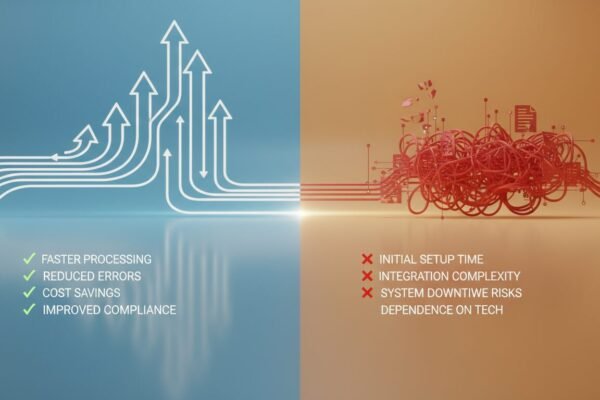
Pros and Cons
Pros
- Significant time savings: Most small businesses reclaim 10 to 15 hours per week by automating routine tasks.
- Reduced errors: Automated rules execute consistently, eliminating the human mistakes that damage client relationships.
- Scalability without added headcount: Handle more clients and more volume without proportionally growing your payroll.
- Low barrier to entry: No-code platforms like Zapier and DigiMe require no technical background to get started.
- Affordable pricing: Most tools start between $15 and $30 per month, with free tiers available for basic use cases.
Cons
- Initial setup time: Mapping and building workflows takes real effort upfront, especially for complex multi-step processes.
- Risk of over-automation: Automating the wrong tasks can create rigid systems that break when exceptions occur.
- Data privacy considerations: Connecting multiple apps means sensitive data moves between platforms, requiring careful permission management.
- Employee resistance: Some team members may push back on changes to established routines, requiring deliberate change management.
Ready to Automate Your Business?
Workflow automation for small business isn’t a luxury reserved for companies with big IT budgets. It’s a practical, affordable way to reclaim your time, reduce errors, and serve more clients without burning out your team. The businesses seeing the biggest gains right now are the ones that started small, proved the concept on one or two workflows, and then scaled from there.
Book a free demo at digimeapp.com to see how AI-powered automation can work specifically for your practice or service business. We’ll show you exactly where your biggest time savings are hiding.
Frequently Asked Questions
What exactly is workflow automation for small business?
Workflow automation for small business is the use of software to automatically handle recurring tasks like sending follow-up emails, updating CRM records, or generating invoices based on predefined triggers and rules. It reduces manual work, cuts errors, and frees your team to focus on higher-value activities. Most small businesses can implement their first automated workflow within a single afternoon using no-code tools.
How much does workflow automation cost for a small team?
Many platforms offer free plans for basic needs, and paid plans typically start between $15 and $30 per month. The ROI tends to pay for itself within the first few weeks through time savings alone. For context, reclaiming even 5 hours per week at a modest hourly rate quickly exceeds the monthly subscription cost.
Can I automate workflows if I’m not technical?
Yes. No-code tools like DigiMe and Zapier use visual builders that require no programming knowledge. You select a trigger, define your actions, and map your data fields – similar to building a flowchart. Most users build and test their first workflow within an hour of signing up.
Which tasks should I avoid automating?
Tasks that rely on human intuition, emotional nuance, or unpredictable exceptions are better left to people. Complex client negotiations, creative strategy sessions, and sensitive customer complaints all benefit from a human touch. Automate the rule-based, repetitive work around those interactions instead.
How long does it take to set up an automation?
A simple workflow, like sending a welcome email after a form submission, can be built and tested in under an hour. More complex flows involving multiple conditional branches and several integrated tools may take a few days to build and refine. Starting with a single high-impact workflow is always the right move.
Is my data safe with workflow automation tools?
Reputable platforms use enterprise-grade encryption, SOC 2 certifications, and strict access controls. For maximum security, tools like n8n allow self-hosting so your data never leaves your own servers. Always review what permissions each integration requires and grant only what’s necessary for the workflow to function.